

Archive Notice: This documentation was originally published by Namebase (closed June 2026) and is preserved by the LearnHNS community. Pages may reference services that no longer exist — see current guides at /start/ or SkyInclude's wind-down explainer.
Edit this page on GitHubHandshake DNS
DNS Records on Handshake names
Handshake names use the same DNS format as ICANN domains. The only difference is the TLD Nameserver records are included in the blockchain. There are two type of DNS records.
On Chain Records
NS Records
These are used to identify the Server that provides the Off chain DNS records. You can check these records using a block explorer. To check the records for this example visit https://niami.io/domain/examplename
The format for these records is
| Resource | Value |
|---|---|
| type | NS |
| ns | <NS> |
For example
| Resource | Value |
|---|---|
| type | NS |
| ns | ns.examplename. |
GLUE4 & GLUE6 Records
These records are used to bind IPv4 and IPv6 addresses to Handshake domains. This is used in conjunction with NS records to point to a IP for the Nameserver.
The format for these records is
| Resource | Value |
|---|---|
| type | GLUE4 |
| ns | <NS> |
| address | <IPv4> |
For example
| Resource | Value |
|---|---|
| type | GLUE4 |
| ns | ns.examplename. |
| address | 45.79.95.228 |
DS Records
These records are used for DNSSEC and allows the Nameserver to provide proof that it has the authority to provide DNS records.
The format for these records is
| Resource | Value |
|---|---|
| type | DS |
| keyTag | <KEYTAG> |
| algorithm | <ALGORITHM> |
| digestType | <DIGESTTYPE> |
| digest | <DIGESTVALUE> |
For example
| Resource | Value |
|---|---|
| type | DS |
| keyTag | 7789 |
| algorithm | 8 |
| digestType | 2 |
| digest | 50e0f5c246f85d8d09f8f0c5be4ab3788c3b1cf97f04f47aee3c6343ad758ccd |
TXT Records
These are used for storing arbitrary data. In some cases it is used to prove ownership of a domain.
The format for these records is
| Resource | Value |
|---|---|
| type | TXT |
| text | <TEXT record> |
For example
| Resource | Value |
|---|---|
| type | TXT |
| text | This is an example TXT record |
Off-Chain Records
These records are the same as ICANN domains. They are provided by the nameserver specified in the NS records on the chain. These records include (but not limited to): A, AAAA, CNAME, DS, MX, NS, TLSA, TXT.
Adding DNS records (Bob Wallet / self-custody)
Info 2026 update: Namebase’s DNS manager is offline. Use Bob Wallet or the LearnHNS Chrome extension to edit on-chain records for names you self-custody.
Open your domain in Bob Wallet’s DNS / records panel and add records using the formats described above.
Warning Screenshots below show the legacy Namebase DNS manager UI (offline June 2026). Record types and field values still apply — use Bob Wallet’s equivalent fields.
On-Chain Records
GLUE4
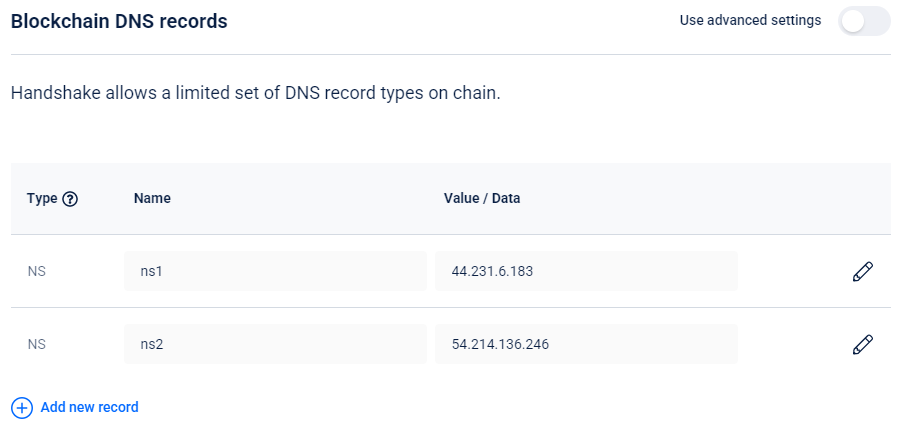
To add a Nameserver using an IP address you need to use a GLUE4 record. For example, to add a nameserver record for GLUE4 with IP address 44.231.6.183 you would add the first line as below:
NS without GLUE4
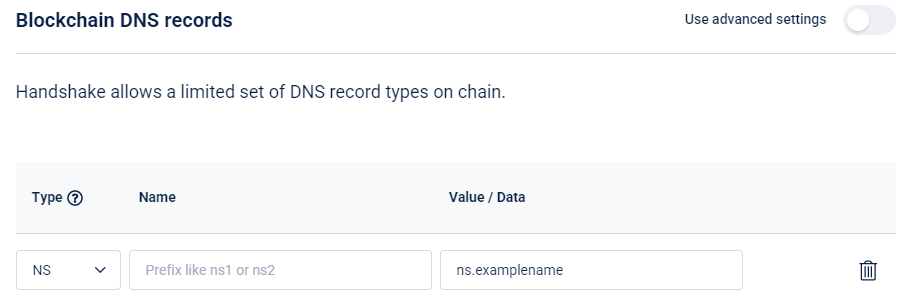
To add a NS record to an existing domain’s GLUE4 (or to point to an ICANN domain’s A record) you need to add the nameserver in the Value field while leaving the Name field blank. This is shown in the below image.
DS Records
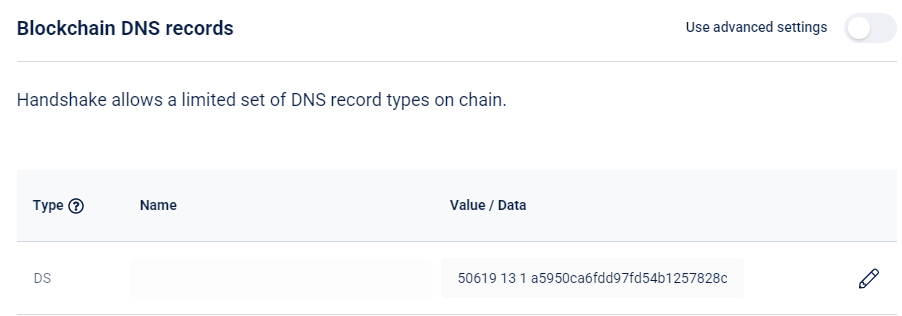
Adding a DS record is straightforward in Bob Wallet. Add the DS content in the Value field. This is shown in the image below.
TXT Records
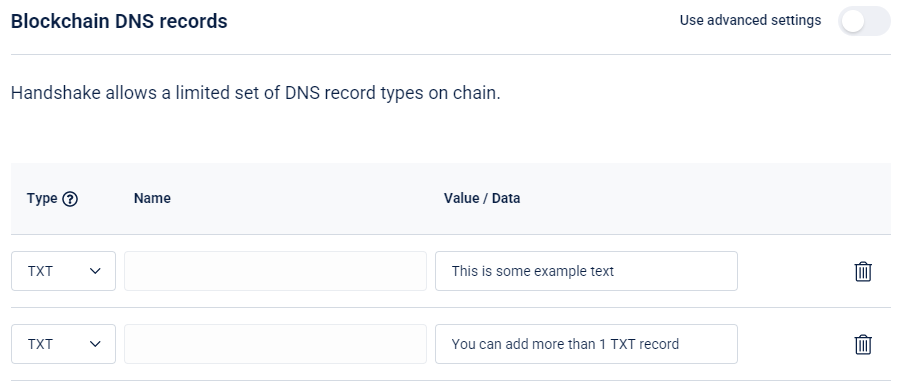
Adding TXT records is as easy as typing the contents of the record. This is shown in the image below.
Off-Chain Records
To add Off-Chain records you must have at least 1 ns records pointing to 44.231.6.183
Common Records
Adding A, AAAA, CNAME, and ALIAS records to the TLD is quite easy. The below image shows the format in case you get stuck.
MX Records
MX records are a little bit more complicated. You need to supply the priority in the Value field as well as the Name of the email server. This is shown in the image below (“10” is the priority for “mail.examplename”).