

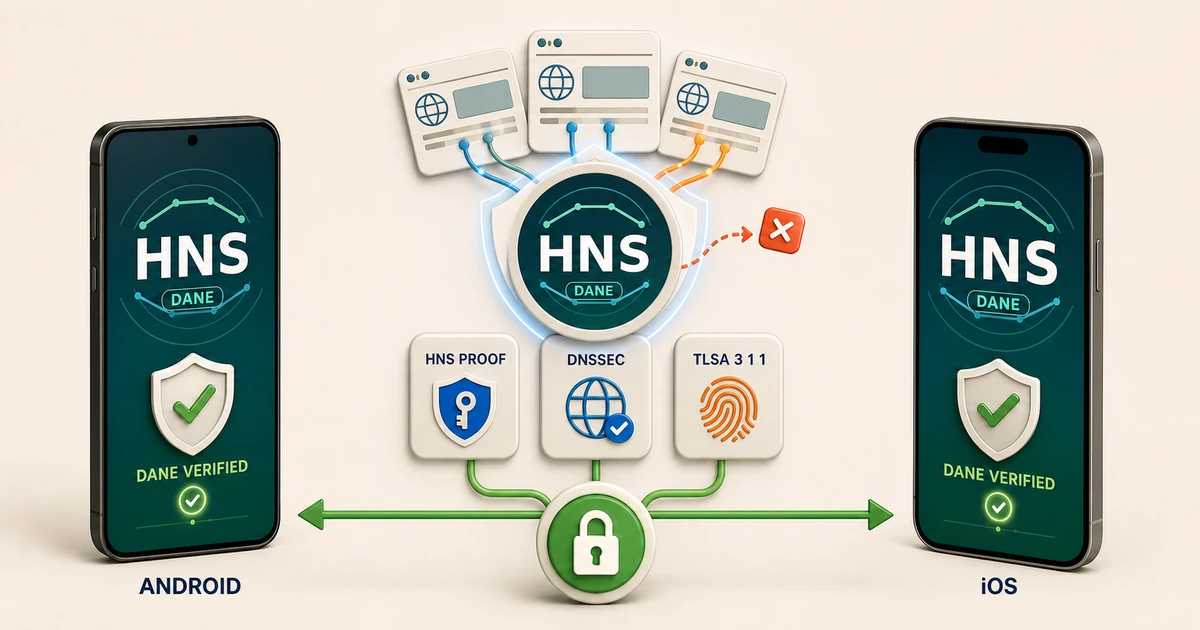
HNS DANE Browser is available as two native mobile browsers: one for Android and one for iOS. Both are built to open Handshake names, validate their cryptographic trust, enforce DNSSEC and TLSA, and show the user how the connection was secured.
The two apps share the same Rust security engine while fitting naturally into their platforms. Android uses a Kotlin and WebView interface. iOS uses Swift, UIKit, and WKWebView. Underneath those native shells, both browsers follow the same resolution and DANE policy.
Android and iOS at a glance
| Android | iOS | |
|---|---|---|
| Current version | 0.5.6 | 0.5.5 |
| Download | Google Play | Apple App Store |
| Native interface | Kotlin and Android WebView | Swift, UIKit, and WKWebView |
| Security engine | Shared Rust runtime | Shared Rust runtime |
| Handshake resolution | Local HNS proof and DNSSEC validation | Local HNS proof and DNSSEC validation |
| DANE | Automatic TLSA discovery and enforcement | Automatic TLSA discovery and enforcement |
Why Handshake needs its own browser path
A Handshake name does not live in the ICANN root. Conventional mobile browsers normally send the name to the operating system’s ICANN resolver and receive no useful answer. Changing DNS can make the name resolve, but resolution alone does not prove that the answer is authentic or make the browser enforce the name’s TLSA policy.
HNS DANE Browser handles the full connection decision:
classify the name
  → validate the Handshake proof or ICANN DNSSEC chain
    → resolve the service
      → retrieve the exact TLSA record
        → verify the certificate or public-key association
          → load or block the connection
That is the difference between merely reaching an HNS website and browsing it with cryptographic provenance.
What happens when you open an HNS name
The browser resolves the name through its Handshake-aware path and validates the returned proof locally. It follows DNSSEC into the name’s zone, retrieves the TLSA record for the requested service, and compares that authenticated association with the certificate or public key presented by the server.
When the proof, DNSSEC chain, TLSA record, and live service all agree, the browser admits the connection as DANE verified. A securely published mismatch is blocked rather than silently converted into ordinary WebPKI.
This creates a direct chain from the Handshake name to the website:
Handshake ownership
  + local proof
  + DNSSEC
  + TLSA
  + matching service key
  = DANE-verified website
ICANN DANE works too
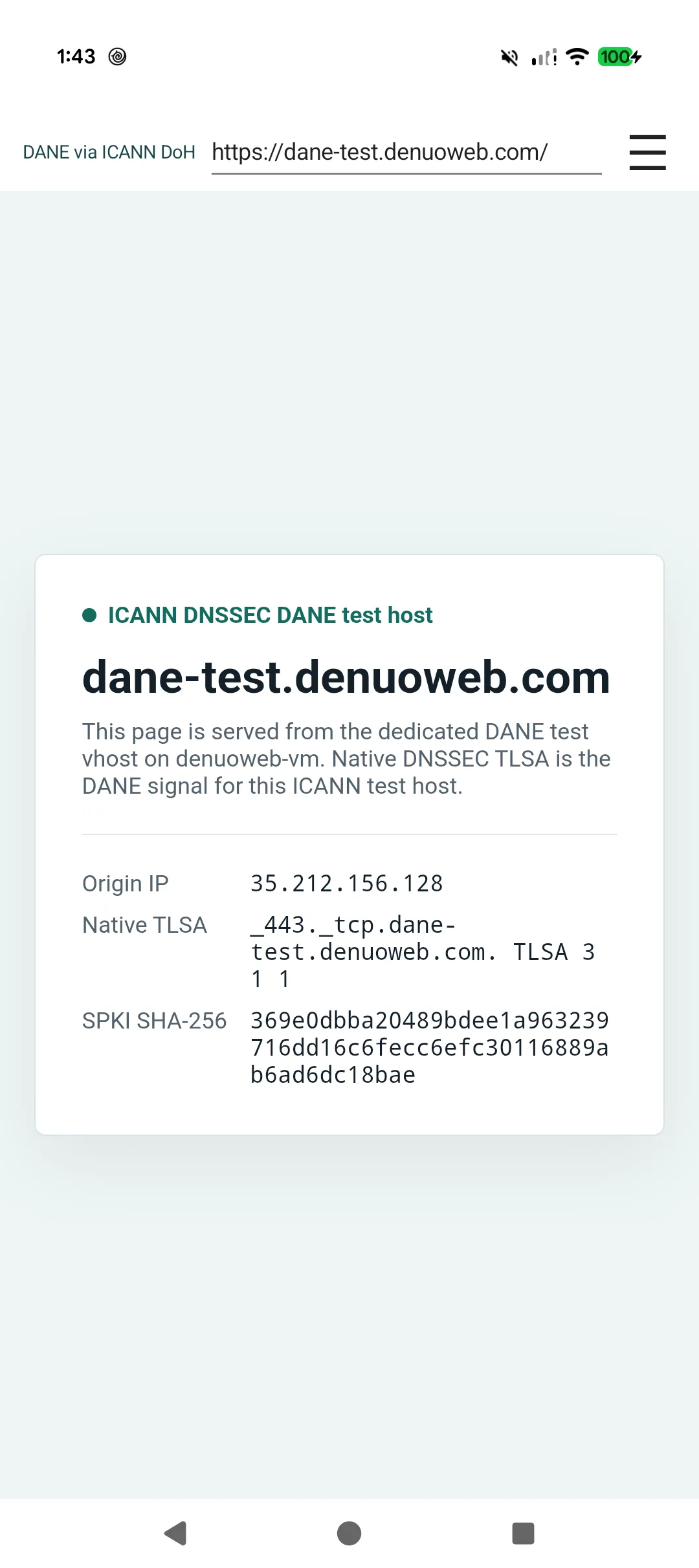
DANE is a DNS standard, not a Handshake-only feature. Android 0.5.6 and iOS 0.5.5 automatically check ICANN domains for DNSSEC-authenticated TLSA records.
For a normal HTTPS connection on port 443, the browser derives the TLSA owner directly from the URL:
_443._tcp.example.com.If a secure TLSA policy exists, the browser enforces it. If DNSSEC proves that no TLSA record exists, the connection can use WebPKI. Bogus DNSSEC, invalid TLSA parameters, and authenticated certificate mismatches fail closed.
The public Huque DANE test sites demonstrate the difference clearly: valid DANE-EE and PKIX associations load, while a wrong hash, bad TLSA parameters, invalid DNSSEC signature, expired signature, or mismatched PKIX association is blocked.
Security you can inspect
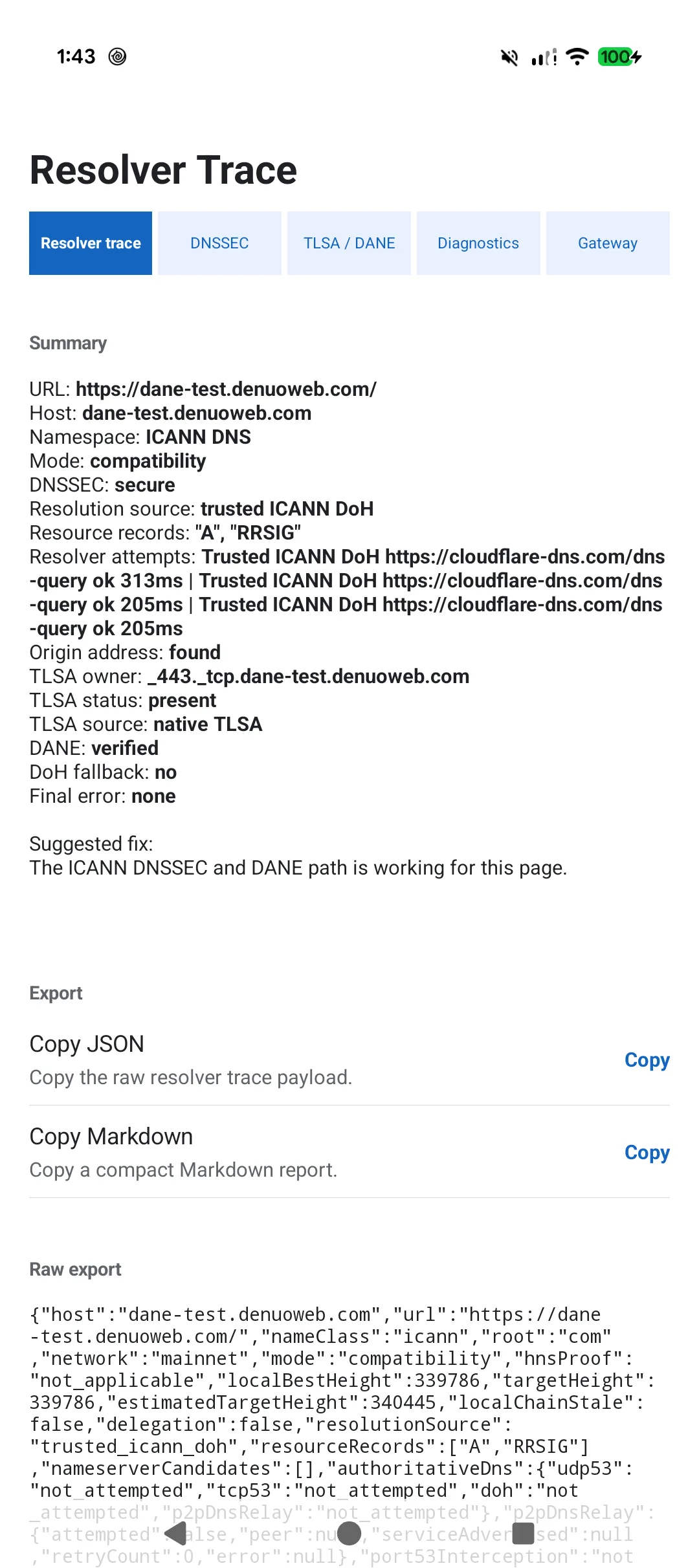
HNS DANE Browser does more than display a page. Its security views make the connection path visible.
You can inspect:
- whether the name was classified as Handshake or ICANN;
- the resolver and DNS transport used;
- the local HNS proof when one applies;
- the DNSSEC result;
- the exact TLSA owner and record;
- the DANE usage and certificate association;
- whether the certificate or public key matched; and
- whether DANE or WebPKI authorized the connection.
This is especially useful for HNS site owners. Instead of guessing why a name failed, they can trace the decision from resolution through DNSSEC, TLSA, and the live TLS certificate.
HNS DANE Browser for Android
The Android edition combines a native Kotlin interface with Android WebView and the shared Rust security runtime. The Rust layer owns Handshake resolution, proof validation, DNSSEC, TLSA discovery, DANE verification, and the authenticated networking boundary used by the app.
The browser includes the resolver trace and detailed DNSSEC/TLSA/DANE views shown below.
Install HNS DANE Browser 0.5.6 from Google Play.
HNS DANE Browser for iOS
The iOS edition brings the same trust model to iPhone through a native Swift and UIKit interface with WKWebView. The Rust engine is packaged for Apple platforms and connected through a stable native interface, keeping proof, DNSSEC, TLSA, and DANE behavior aligned with Android.
Users get the same essential result: Handshake names resolve inside the browser, DANE participates in the connection decision, and the security details remain available for inspection.
Install HNS DANE Browser 0.5.5 from the Apple App Store.
Built for browsing and for building
For everyday users, the browsers make HNS websites accessible without changing system DNS or copying names into a gateway. For developers and operators, the diagnostics provide a practical way to verify each layer of an HNS deployment.
The Learn HNS DNSSEC and DANE setup guide covers the publishing side. The HNS DANE Bootstrap Generator can prepare HNS or ICANN DNSSEC/TLSA records and the commands used to verify them.
Get both browsers
- HNS DANE Browser 0.5.6 for Android
- HNS DANE Browser 0.5.5 for iOS
- Source and technical documentation
The mobile browsers are public and source-available under the PolyForm Noncommercial License 1.0.0. Noncommercial use, study, modification, and redistribution are allowed under that license; commercial use requires separate permission from Denuo Web, LLC. Donations are optional and unlock no app features.