

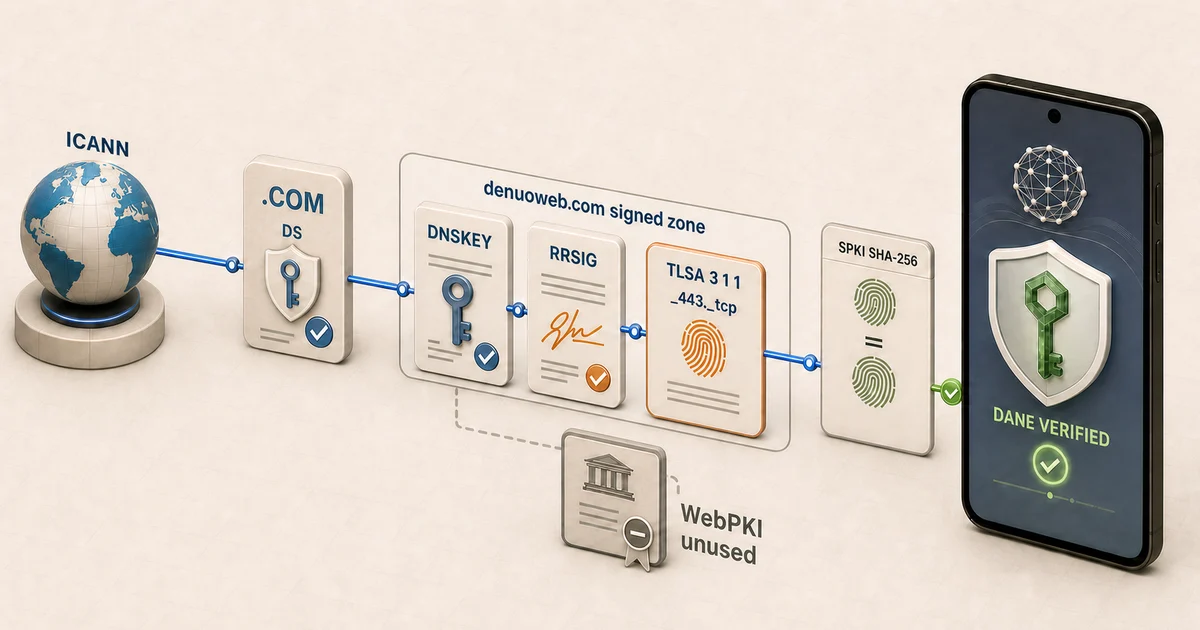
DANE is not only for Handshake names. An ICANN domain can publish a DNSSEC-authenticated TLSA record that binds an HTTPS service to an approved certificate, public key, or PKIX trust anchor. The missing piece has usually been the client: conventional browsers do not apply that record to the TLS connection.
HNS DANE Browser has automatic TLSA discovery and enforcement for ordinary ICANN HTTPS navigation in the shared Rust security path used by the Android and iOS apps.
How automatic ICANN DANE works
For an ICANN website, the trust chain starts at the conventional DNS root:
ICANN root
  → TLD DNSSEC
    → domain DS and DNSKEY
      → signed address and TLSA records
        → live HTTPS certificate or public key
          → browser trust decision
Normal navigation already gives the browser the hostname, port, and transport. For https://example.com/ on TCP port 443, it derives:
_443._tcp.example.com.A common end-entity public-key association is:
_443._tcp.example.com. IN TLSA 3 1 1 <SHA-256-SPKI-DIGEST>Here, 3 selects DANE-EE, 1 selects the certificate’s SubjectPublicKeyInfo, and the final 1 selects SHA-256. Other TLSA usages can connect DANE to a PKIX certificate chain. The record format is defined by RFC 6698, with operational guidance in RFC 7671.
The browser classifies the authenticated DNS result before admitting the connection:
| DNS/TLSA result | Required browser behavior |
|---|---|
| DNSSEC-secure, supported TLSA association present | Enforce TLSA; admit only a matching certificate or chain |
| DNSSEC-authenticated denial of TLSA | No DANE policy was published; allow the explicit WebPKI path |
| Provably insecure delegation | Report DANE unavailable and use WebPKI |
| Bogus, indeterminate, malformed, or unsupported TLSA policy | Fail closed rather than silently downgrade |
That final rule is essential. A signed record that cannot be validated or interpreted is not the same as authenticated absence.
A public seven-site DANE test
Shumon Huque’s DANE test sites provide valid DANE-EE and PKIX controls alongside deliberately broken DNSSEC and TLSA cases. They make a useful acceptance matrix for the Android and iOS browsers.
| Test site | Fixture | Mobile browser action |
|---|---|---|
| good.dane.huque.com | Valid signed DANE-EE association matching the server certificate | Allow: DNSSEC, TLSA, and DANE verify |
| badhash.dane.huque.com | Signed DANE-EE hash does not match the server certificate | Block: certificate association mismatch |
| badparam.dane.huque.com | Signed TLSA record has unusable parameters | Block: invalid TLSA parameters |
| badsig.busted.huque.com | Incorrect DNSSEC signature | Block: DNSSEC validation failure |
| expiredsig.busted.huque.com | Expired DNSSEC signature | Block: expired DNSSEC signature |
| good-pkixta.dane.huque.com | Valid PKIX-TA association matching the root issuer | Allow: authenticated chain association matches |
| bad-pkixta.dane.huque.com | PKIX association does not match the certificate chain | Block: authenticated chain association mismatch |
The security rule is straightforward: valid associations load, while invalid parameters, broken signatures, expired signatures, and certificate mismatches are blocked. The next improvement will be to make the on-screen explanation as specific as this test matrix itself!
The Denuo Web ICANN DANE site
The project’s original live diagnostic host remains useful:
https://dane-test.denuoweb.com/
It publishes standard ICANN DNSSEC and a TLSA record for _443._tcp.dane-test.denuoweb.com.
The enforcement boundary is larger than the address bar
Automatic discovery is only meaningful if a page cannot escape it after the top-level navigation. The shipped policy is placed below the browser UI so the decision covers ordinary navigation and the secondary traffic that a page can initiate, including redirects, subresources, WebSockets, downloads, and supported service-worker paths.
The intended rule is simple:
secure DNS answer
  + authenticated, supported TLSA
  + matching live certificate or chain
  = DANE-admitted connection
A securely published mismatch, malformed policy, bogus DNSSEC result, or unsupported mandatory association must not be converted into ordinary WebPKI. WebPKI is retained only when authenticated DNS says no TLSA policy exists or the delegation is provably insecure.
Available on Android and iOS
Android 0.5.6
The Android app combines a Kotlin/WebView shell with the shared Rust runtime and an authenticated loopback networking boundary. Version 0.5.6 is available from Google Play.
iOS 0.5.5
The iOS app uses a Swift/UIKit and WKWebView shell, a stable C ABI, and the same Rust policy engine packaged as an XCFramework. Version 0.5.5 is available from the Apple App Store.
Preparing an ICANN website for DANE
A site operator needs an authoritative DNS service that can sign the zone and publish TLSA. The HNS DANE Bootstrap Generator has an ICANN mode that prepares the relevant records and verification commands.
- Enable authoritative DNSSEC for the zone.
- Publish the DS record through the registrar or parent zone.
- Publish TLSA for the exact hostname, port, and transport.
- Verify the complete DNSSEC chain.
- Confirm that the live certificate, SPKI, or chain target matches the record.
- Plan certificate and TLSA rotation with a safe TTL overlap.
For an SPKI pin such as TLSA 3 1 1, publish associations for both the current and next public keys before changing the server key. Wait through the relevant DNS cache window, deploy the new key, verify it, and only then retire the old association.
Can your DNS provider complete the DANE path?
For an ICANN domain, publishing TLSA is an authoritative-DNS capability. A usable managed DANE path requires the DNS product to do both of the following:
- publish custom TLSA resource records; and
- sign the authoritative zone with DNSSEC and provide the DNSKEY or DS material needed to complete the parent chain.
The registrar, authoritative DNS provider, and website host may be three different companies. TLSA belongs in the authoritative child zone. The registrar only needs to provide the parent-side NS and DS controls when authoritative DNS is hosted elsewhere.
You usually do not need to move the website. A site can remain on Wix, Shopify, a VPS, a CDN, or another hosting platform while its authoritative DNS moves to a provider that supports DNSSEC signing and TLSA. The new DNS zone must retain every record required by the website, email, verification, and other services.
What a 52-provider documentation audit found
A documentation audit conducted on July 25, 2026 examined 52 managed authoritative-DNS products. It evaluated the documented product path, not company market share or an undocumented feature that might exist in a particular account.
- 23 of 52 (44%) documented both TLSA publication and authoritative DNSSEC signing.
- 20 of 52 lacked a documented DANE-ready path because TLSA and/or DNSSEC support was missing.
- 2 of 52 exposed part of the required path but lacked documented authoritative zone signing.
- 7 of 52 remained unresolved because current documentation did not establish both required capabilities.
Provider features can vary by plan, product family, region, and interface. Confirm the exact service before moving a production zone.
Providers with a documented managed DANE path
The audit found documented TLSA and authoritative DNSSEC support through Akamai Edge DNS, AWS Route 53, Azure DNS, Cloudflare, ClouDNS, deSEC, DNSimple, easyDNS, Gandi LiveDNS, Google Cloud DNS, IBM NS1 Connect, IONOS Cloud DNS, Namecheap, Oracle OCI DNS, Porkbun, Spaceship, Squarespace, TransIP, OVHcloud, Infomaniak, INWX, Mythic Beasts, and Canada’s Webnames Premium DNS.
Products without a documented complete path
At the time of review, the following products did not document TLSA among their supported record types: Wix, Shopify DNS, GoDaddy DNS, DigitalOcean, Netlify, Vercel, Hostinger, WordPress.com, Dynadot, DNS Made Easy, Akamai/Linode DNS Manager, Bluehost, NameSilo, VentraIP, Crazy Domains, Alibaba Cloud DNS, Tencent DNSPod, Huawei Cloud DNS, and NAVER Global DNS.
xneelo lacked DNSSEC. Hetzner documented TLSA records but not authoritative signing for its managed DNS, while Hurricane Electric Free DNS did not document production DNSSEC signing. Metaname, VPSCity, Domains.co.za, Webcentral, Afrihost, Locaweb, and Registro.br remained unresolved.
Switch authoritative DNS without moving the site
- Choose a provider that explicitly supports custom TLSA records and authoritative DNSSEC signing.
- Copy the complete existing zone, including A/AAAA, CNAME, MX, TXT, mail-security, and service-verification records.
- Reproduce every record required by the website host, CDN, email service, and other integrations.
- Follow the providers’ documented DNSSEC migration procedure and account for TTL and cache windows.
- Change the domain’s NS delegation at the registrar while leaving the website on its existing host.
- Publish the new provider’s DS through the registrar or parent and validate the complete DNSSEC chain.
- Publish TLSA from the exact key served by the production hostname, then test it with a validating resolver and a DANE-capable browser.
What this means for Handshake names
The 23-of-52 result does not mean that only 44% of HNS websites can use DANE. Handshake supplies the root and the name’s NS/DS delegation. A delegated HNS authoritative server can publish its own DNSKEY, A/AAAA, TLSA, and RRSIG records without depending on a managed provider’s record-entry interface.
Managed-provider limitations matter again only when an HNS operator delegates the child zone to one of those services. With an HNS-aware authoritative server, the website can stay at its existing host while the HNS DNSSEC/TLSA chain is served independently. The Learn HNS DNSSEC and DANE setup guide covers that HNS-native deployment.
Verification resources and source
- Huque DANE test sites
- HNS DANE Browser mobile source
- Android 0.5.6 release
- Android on Google Play
- iOS on the App Store
- Denuo Web ICANN DANE test site
- HNS and ICANN DANE Bootstrap Generator
The mobile browser repository is public and source-available under the PolyForm Noncommercial License 1.0.0. Noncommercial use, study, modification, and redistribution are allowed under that license; commercial use requires separate permission from Denuo Web, LLC.